Small footprint of a power editor in initramfs

Have you ever found yourself trapped in a restricted root filesystem where every megabyte has to be weighed? For most people, this is a rarity, but when working with initramfs—the transient filesystem used by the Linux kernel during the boot process—space is everything.
A text mode editor is a vital tool for navigating filesystem, debugging problems and changing configurations. However, as a dedicated Emacs user, the standard lightweight alternatives like vi, nano, or pico is not in the favored list. In such an extreme environment where I from time to time have to handle critical boot issues, a working, light, and powerful editor is to me not just a vital tool but a luxury.
The Challenge: Why Not emacs-nox?
Navigating a filesystem without a proper editor is like living in a read-only world. While echo redirection and sed can handle simple tasks, complex configuration changes become a painful exercise in precision.
Normally, I would reach for emacs-nox (the full Emacs experience without the X11 overhead). But in an initramfs environment, adding emacs-nox and its dependencies can balloon the image size by over 100MB. For a system that needs to be lean and fast, that’s simply not an option.
The Solution: mg (Micro GNU Emacs)
mg is a microscopic editor that maintains Emacs keybindings while remaining incredibly lightweight. On a standard Ubuntu system, it’s a tiny footprint:
1
2
3
4
5
6
7
8
9
10
11
12
13
14
15
16
17
# apt show mg
Package: mg
Version: 20230501-1
Priority: optional
Section: universe/editors
Origin: Ubuntu
Maintainer: Ubuntu Developers <ubuntu-devel-discuss@lists.ubuntu.com>
Original-Maintainer: Harald Dunkel <harri@afaics.de>
Bugs: https://bugs.launchpad.net/ubuntu/+filebug
Installed-Size: 273 kB
Provides: editor
Depends: libbsd0 (>= 0.5.0), libc6 (>= 2.38), libtinfo6 (>= 6)
Homepage: https://homepage.boetes.org/software/mg/
Download-Size: 121 kB
APT-Manual-Installed: yes
APT-Sources: http://mirror.math.princeton.edu/pub/ubuntu noble/universe amd64 Packages
Description: microscopic GNU Emacs-style editor
On a standard Linux operating system like Ubuntu, it is as simple as
1
root@frad:~/Workspace/# # apt-get install mg
Nonetheless, we are dealing with a mimimized distroless rootfilesystem that doen’t come with package managers of any sort. To get mg to work inside mini rootfs, assuming you’re on a Ubuntu, install mg with the above. After installation, the binary can be located with
All that is still on host system. To get mg working in initramfs, we have to perform a manual port.
Step 1: Binary Placement
First, we locate the binary on the host and copy it into our target initramfs directory:
1
2
3
root@frad:~/Workspace/# # which mg
/usr/bin/mg
root@frad:~/Workspace/# install -p -D -m 0755 /usr/bin/mg ~/Workspace/img/mini_initramfs
Let take a peek how it’d work inside the rootfs
1
2
3
4
5
6
7
8
root@frad:~/Workspace/# chroot ~/Workspace/img/mini_initramfs
/ # echo $PATH
/usr/local/sbin:/usr/local/bin:/usr/sbin:/usr/bin:/sbin:/bin
/ # mg
/bin/sh: mg: not found
/ # ls -lt /bin/mg
-rwxr-xr-x    1 0        0           231080 Apr 20 06:48 /bin/mg
/ #
Invoking md command inside the mini initramfs came back with an error that “mg” was not found. Further commands confirmed that the binary was there and path was also correct. The installed mg turned out to be a dynamically-linked binary so the shared libraries also need to be copied.
Step 2: Resolving Dependencies
To fix this, we use ldd to identify the shared library dependencies:
1
2
3
4
5
root@frad:~/Workspace/# ldd /usr/bin/mg
    libtinfo.so.6 => /lib/x86_64-linux-gnu/libtinfo.so.6
    libbsd.so.0 => /lib/x86_64-linux-gnu/libbsd.so.0
    libc.so.6 => /lib/x86_64-linux-gnu/libc.so.6
    /lib64/ld-linux-x86-64.so.2
We must replicate this structure inside our initramfs:
Create directory structure and symlinks
1
2
3
4
root@frad:~/Workspace/# mkdir -p ~/Workspace/img/mini_initramfs/usr/lib/x86_64-linux-gnu
root@frad:~/Workspace/# ln -sf usr/lib ~/Workspace/img/mini_initramfs/lib
root@frad:~/Workspace/# ln -sf ../lib/x86_64-linux-gnu/ld-linux-x86-64.so.2 ~/Workspace/img/mini_initramfs/lib64/
root@frad:~/Workspace/# ldd /usr/bin/mg | grep "=>" | awk '{print $3}' | xargs -i cp {} ~/Workspace/img/mini_initramfs{}
Step 3: Solving the “Terminal Panic”
After this, give it another try!
1
2
3
4
5
root@frad:~/Workspace/# chroot ~/Workspace/img/mini_initramfs
/ # mg
panic: Terminal setup failed
/ # echo $TERM
xterm
mg was launched with previous errors gone. But there appeared to be a new error about terminal panic. The terminal is “xterm”. With some more digging it pointed to missing data/db of xterm capabilities. As such, I copied xterm pertinent data into rootfs
1
2
3
4
5
6
7
8
9
10
11
12
13
14
15
16
17
18
19
20
21
22
23
24
25
/bin/bash ~/Workspace/scripts/install ~/Workspace/img/mini_initramfs /usr/share/terminfo/x/xterm usr/share/terminfo/x
root@frad:~/Workspace/# chroot ~/Workspace/img/mini_initramfs
/ # ls -lt /usr/share/terminfo/x/
total 4
-rw-r--r--    1 0        0             3991 Apr  8  2024 xterm
/ # mg
/ #
/ # ls -lt /lib/x86_64-linux-gnu/ /lib64
lrwxrwxrwx    1 0        0                9 Apr 20 08:19 /lib64 -> usr/lib64

/lib/x86_64-linux-gnu/:
total 2652
-rwxr-xr-x    1 0        0           236616 Apr 20 08:19 ld-linux-x86-64.so.2
-rwxr-xr-x    1 0        0             3632 Apr 20 08:19 ld-linux-x86-64.so.2.debug
-rw-r--r--    1 0        0            80888 Apr 20 08:19 libbsd.so.0
-rwxr-xr-x    1 0        0          2125328 Apr 20 08:19 libc.so.6
-rw-r--r--    1 0        0            55536 Apr 20 08:19 libmd.so.0
-rw-r--r--    1 0        0           208328 Apr 20 08:19 libtinfo.so.6
/ # du -hsc /lib/x86_64-linux-gnu/ /lib64 /bin/mg
2.6M	/lib/x86_64-linux-gnu/
0	/lib64
228.0K	/bin/mg
2.8M	total
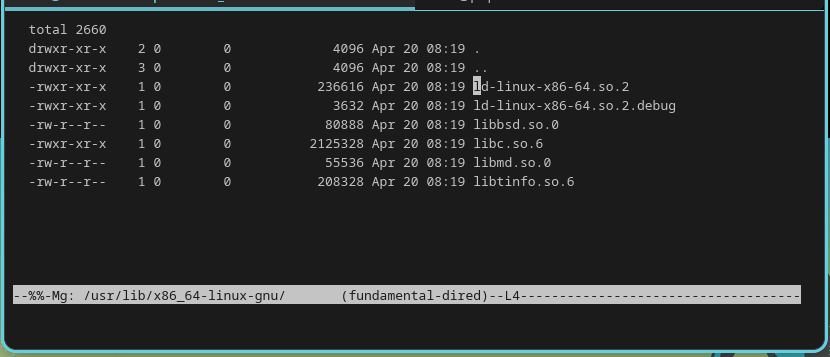
/ # mg /lib/x86_64-linux-gnu/
/ #
The Result
And there we go: a functional, Emacs-style editor with small footprint (2.8M in total) in a distroless, customized and size-critical filesystem. I’d play a mission-critical role when it comes to future trouble-shooting during bootstrapping, expecially when kernel panics.